Build a searchable record trail for metal heats and split material
For stores, inventory control and production teams · Compare approaches
TL;DR — what you’ll learn
- Link each recorded split to its parent receipt or stock identifier.
- Reconcile quantities in a consistent unit before interpreting the balance.
- Keep a missing heat reference as a visible exception rather than guessing its identity.
- Test both backward lookup from a job and forward lookup from a receipt.
A stores report can show the right number of bars while a production team cannot find which heat record belongs to a remnant. The problem is a broken record link. A searchable trail makes the receipt, recorded transformations and subsequent movements retrievable from either end.
This is a data model for those links. It does not specify physical marking, certify material identity or authorize use of an unidentified piece. Those activities continue under the plant's material-control procedures.
Reconcile a split before searching its descendants
In this original illustration, the recorded receipt is one 6.0 m bar. Its cut record lists four 1.0 m pieces, a 1.8 m remnant and 0.2 m of cutting and trim loss.
Scroll horizontally to see all columns.
| Recorded output | Quantity | Length accounted for |
|---|---|---|
| Cut pieces | 4 × 1.0 m | 4.0 m |
| Remnant | 1 × 1.8 m | 1.8 m |
| Cutting and trim loss | Recorded total | 0.2 m |
| Total | 6.0 m |
The length balance is 4.0 + 1.8 + 0.2 = 6.0 m. This checks the arithmetic of the recorded split. It does not prove the heat identity, dimensions or quality of any physical piece. Weight and length require an explicit conversion basis if both appear in the report; they cannot be added as if they shared a unit.
Give the split event its own identifier and retain the parent identifier on each output record. A heat reference, receipt reference and internal piece identifier serve different purposes. Keeping them separately avoids turning a supplier's reused batch label into an accidental global key.
GS1 describes traceability in terms of identification and information associated with physical flows. Use that principle to structure retrievable links; the example identifiers here are illustrative and are not a GS1 implementation specification. GS1 traceability explanation.
Build a searchable record trail for metal heats and split material — reporting workflow
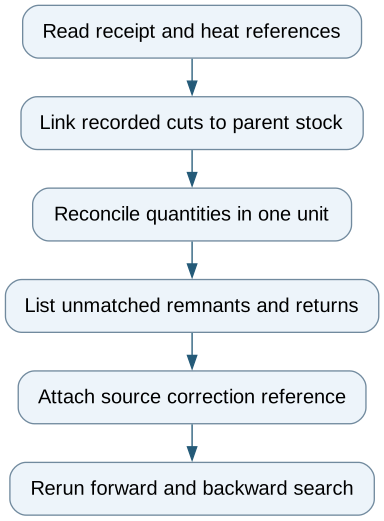
Follow the workflow below, or open its complete text version.
Read the complete workflow as text
- Read receipt and heat references → Link recorded cuts to parent stock
- Link recorded cuts to parent stock → Reconcile quantities in one unit
- Reconcile quantities in one unit → List unmatched remnants and returns
- List unmatched remnants and returns → Attach source correction reference
- Attach source correction reference → Rerun forward and backward search
Make broken links searchable too
A remnant return with no parent reference belongs in an unmatched-record queue. A similar length or nearby storage location is a search lead, not proof of identity. If the responsible team later supplies a correction, retain its source and the earlier missing-link state so a reviewer can reconstruct what the report knew at the time.
Movements should reference the same piece or portion rather than creating a new independent quantity every time it changes location. Where two heats are recorded against an assembly, retain both parent links. A one-parent-only screen can produce a tidy but incomplete lineage.
Test the two directions independently
Starting from a job, retrieve the recorded piece, split, receipt and heat evidence. Starting from a receipt, retrieve all recorded descendants, including remnants, returns and shipped-job references. A missing child should appear as an exception rather than disappear from the count.
A spreadsheet may demonstrate this for one receipt. Existing batch or serial features may cover the full process. Additional software is useful only when the native records cannot represent or retrieve the required relationships.
Begin with one complete bar history and one deliberately incomplete return. The report passes its data test when it reproduces the known links, balances the stated units and clearly identifies the gap. Physical identification and release remain outside that test.
Compare this workflow with your current setup
Share the step that takes the most manual work, the systems involved and the exceptions your team handles. That gives us a concrete starting point for comparing approaches.
Sources and further reading
Sources checked 15 October 2026. Worked examples and workflow diagrams are original illustrations, not reported client results.