Reconcile NCR quantities across stock, work and shipments
For quality, engineering and records teams · Compare approaches
TL;DR — what you’ll learn
- Treat the NCR's supplied scope as an input to the report.
- Account for distinct physical portions at a stated cutoff.
- Separate location, observed condition and disposition fields.
- A balanced quantity report does not establish containment or permission to use material.
A nonconformance report, or NCR, names a batch, but its quantity appears in several systems: receipt, stores movement, job issue and shipment. Adding every transaction can count the same pieces repeatedly. The useful reporting question is where each distinct portion was recorded at the chosen cutoff.
This article covers that quantity account. It does not determine the affected scope or prescribe containment, concession, rework, scrap or customer action. Those decisions belong to the quality process that supplies the report's inputs.
Start with one supplied scope and one cutoff
In this original illustration, quality supplies an NCR reference covering 100 potentially affected pieces. The reconstructed location account is:
Scroll horizontally to see all columns.
| Location category at the cutoff | Distinct pieces | Supporting reference |
|---|---|---|
| Stores | 60 | Bin and receipt records |
| Assembly work | 25 | Job issue and WIP records |
| Shipped | 15 | Dispatch-line references |
| Total | 100 | Reconciled to supplied scope |
The arithmetic is 60 + 25 + 15 = 100. It describes potentially affected pieces within the supplied scope, not 100 confirmed defects. The shipped row supplies dispatch references; it does not determine whether a customer notice or recall is needed.
If the 25 assembly pieces also appear in a receipt-history export, retain that receipt as evidence but do not count it as a second current location. Conversely, if five of the 100 pieces have no locatable movement trail, show 95 located and five unresolved. Do not assign the five to stores merely to make the report balance.
ERPNext's nonconformance record supports observations, status and corrective or preventive actions. Those record fields do not by themselves establish a complete quantity-location reconciliation; inspect the native links before adding a separate report. ERPNext nonconformance documentation.
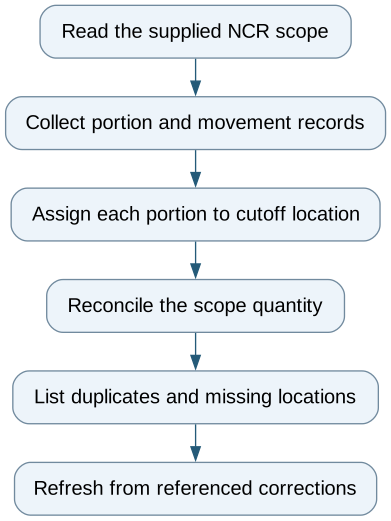
Reconcile NCR quantities across stock, work and shipments — reporting workflow
Follow the workflow below, or open its complete text version.
Read the complete workflow as text
- Read the supplied NCR scope → Collect portion and movement records
- Collect portion and movement records → Assign each portion to cutoff location
- Assign each portion to cutoff location → Reconcile the scope quantity
- Reconcile the scope quantity → List duplicates and missing locations
- List duplicates and missing locations → Refresh from referenced corrections
Keep status dimensions separate
A row can be physically in stores, named in an NCR and awaiting a quality decision. Collapsing those into one “open” status hides useful information. Keep the location observation, reported condition, quality-status reference and disposition reference in separate columns, including unknown values.
Use a stable portion identifier where the source supports one. For bulk quantities, document the allocation method and avoid overlapping portions. Store the source transaction and its reversal or correction link. Otherwise a corrected issue can look like another movement and inflate the balance.
A report refresh needs a source cutoff and extraction timestamp. Late movements may explain why a previously complete account no longer matches a current stock screen. Preserve the earlier view and show the change instead of silently replacing its evidence.
Test gaps as deliberately as matches
Test a duplicate receipt row, a transfer between stores and assembly, a partial shipment, a reversed issue and a missing location. A useful exception list identifies the affected portion and the precise missing or conflicting record.
A worksheet can demonstrate one NCR. Native batch genealogy and stock reports may provide the required links. Integration is justified when the same reconciliation repeatedly crosses systems, not simply because the NCR form has many fields.
Begin with a completed historical example and a supplied scope. The reporting acceptance question is whether the same physical portion is counted once and every unresolved quantity remains visible. Quality approval and physical containment are separate outcomes.
Compare this workflow with your current setup
Share the step that takes the most manual work, the systems involved and the exceptions your team handles. That gives us a concrete starting point for comparing approaches.
Sources and further reading
Sources checked 15 October 2026. Worked examples and workflow diagrams are original illustrations, not reported client results.