Count line-side stock without double-counting material already in WIP
For stores, inventory control and production teams · Compare approaches
TL;DR — what you’ll learn
- Define when a component becomes work in progress before counting the line-side location.
- Keep loose stock separate from installed components whose consumption has not yet posted.
- Reconcile delayed backflush and movements at the count cutoff before approving adjustments.
- Test corrections and late production confirmations so the same consumption cannot post twice.
A storekeeper counts fewer components beside an assembly line than the ERP reports. Production says the missing parts are already fitted into unfinished units. Finance sees a proposed stock write-off. The disagreement is about the boundary between raw material and work in progress, or WIP, before it is about loss.
Count physical states separately and connect them to the consumption event. Backflush is a process that records component consumption from a production event or configured basis. A lag between assembly and that event can leave installed material appearing as unconsumed stock.
Build a physical-to-recorded bridge
In this illustrative example, one component is required per assembly. At 11:00 the raw-material ledger shows 100 components at the line. There are 70 loose components and 30 fitted into unfinished assemblies. No components moved across the count boundary during the agreed count window.
| Physical state | Quantity | Treatment at the review |
|---|---|---|
| Loose, unconsumed components | 70 | Count as line-side raw material |
| Installed in identified WIP | 30 | Link to pending consumption and the assemblies |
| Total components accounted for | 100 | Explain the ledger without a loss adjustment |
Posting the authorised consumption reduces the raw-material ledger to 70 under this example's process. The 30 installed components are already part of the observed WIP; a posting changes their recorded treatment, not the physical count. Do not post a 30-component count loss and then consume the same 30 through backflush. Confirm the ERP's issue, transfer, completion and WIP-valuation model before choosing the correction.
Microsoft documents manual consumption and automatic triggers at start, finish or availability at the production location, with relevant configuration limits. A posting lag is therefore possible under a finish-based process, but cannot be assumed for every line. Confirm the selected trigger and any BOM/order override. Microsoft material-consumption flushing principles.
Count and posting reconciliation
Scroll horizontally to explore the full diagram, or open the text version below.
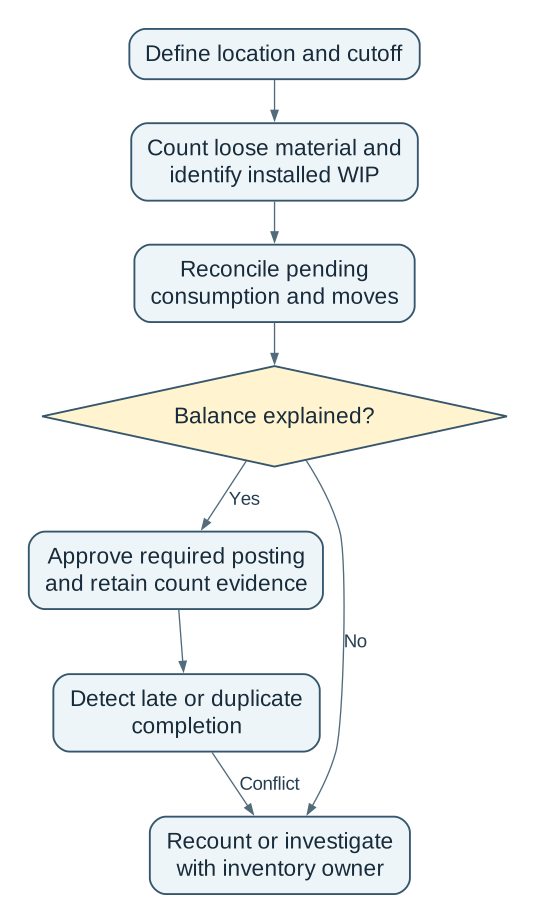
Read the complete workflow as text
- Define location and cutoff → Count loose material and identify installed WIP
- Count loose material and identify installed WIP → Reconcile pending consumption and moves
- Reconcile pending consumption and moves → Balance explained?
- Balance explained? → Yes: Approve required posting and retain count evidence
- Balance explained? → No: Recount or investigate with inventory owner
- Approve required posting and retain count evidence → Detect late or duplicate completion
- Detect late or duplicate completion → Conflict: Recount or investigate with inventory owner
Give the counter a boundary they can see
Identify the location, item, unit, revision and count time. Separate unopened supply, loose issued material, installed WIP, rejected pieces and returns awaiting movement. Avoid asking counters to infer consumption from appearance alone: link assemblies or containers to jobs and operations.
If production continues, record moves across the boundary with timestamps and transaction identities. A component delivered after the count must not be used to explain an earlier shortage. Where timing cannot be reconstructed, mark the affected portion unresolved and recount within a controlled window.
Stores owns the physical observation. Production confirms installation and the pending job event. The inventory controller approves any genuine adjustment under the site's policy. A counter should not approve their own unexplained discrepancy simply to close the session.
Correct the record without creating the next variance
Suppose a supervisor manually posts the 30-component consumption while the completion interface is offline. The interface later resends the original completion. Without a stable event identity or an approved reconciliation step, it can consume another 30.
Retain the original job, operation, quantity, event time, correction reference and posting result. Route a late competing event to review. A rejected or reversed completion should reopen the affected reconciliation instead of silently restoring stock without checking the physical state.
A paper count plus a reviewed reconciliation may work for one line. ERP configuration is preferable when the required states and event controls already exist. An integration becomes useful when production confirmation and inventory posting have separate clocks or owners. Computer vision may assist a count, but it cannot establish whether an observed component is legally or operationally released for use.
Accept a trustworthy balance, not just a completed count
Use the 100-component scenario in a demonstration. Then introduce a return, a late scan, a duplicate completion and one genuinely missing loose component. Require the system to distinguish timing, consumption and loss, and retain the authorised correction trail.
Line-side counting becomes useful when it explains what is loose, what is installed and which event still needs to post. That explanation protects both stock accuracy and the costing of unfinished work.
- Draw the material-to-WIP boundary for one assembly operation.
- Count loose and installed quantities separately and reconcile the posting lag.
- Test the late-event correction before allowing routine adjustments from the count screen.
Ask NextEdge Labs to assess the line-side reconciliation using the job flow, ERP consumption trigger and typical posting delay.
Compare this workflow with your current setup
Share the step that takes the most manual work, the systems involved and the exceptions your team handles. That gives us a concrete starting point for comparing approaches.
Sources and further reading
Sources checked 15 October 2026. Worked examples and workflow diagrams are original illustrations, not reported client results.