Compare invoice, PO and receipt quantities without hiding partial deliveries
For finance, costing and accounts teams · Compare approaches
TL;DR — what you’ll learn
- Compare quantities at invoice, purchase-order and receipt-line level.
- Display receipt status separately from the quantity received.
- Track prior matches so the same quantity is not counted twice.
- Report differences without deciding payment or accounting treatment.
An invoice is for 100 pieces, but the receipt records show only 80. Ten of those 80 also carry a hold status. Combining the missing delivery and the held receipt into a single mismatch makes the report harder to interpret.
A three-way comparison can show what the documents say. It cannot establish payment eligibility without the organization's matching and approval rules. This article prepares a read-only quantity review and leaves those rules as external inputs.
Keep document quantity and status separate
In this original illustration, one PO line orders 100 pieces and the invoice references all 100. The current receipt evidence is:
Scroll horizontally to see all columns.
| Record view | Pieces | Interpretation |
|---|---|---|
| PO and invoice quantity | 100 | Quantities on the supplied documents |
| Recorded receipts | 80 | Receipt quantity found at the cutoff |
| Of those receipts: status labelled released | 70 | A source status, not a payment decision |
| Of those receipts: status labelled held | 10 | A source status requiring separate interpretation |
| Invoice quantity without receipt evidence | 20 | 100 − 80 |
The receipt-status rows reconcile: 70 + 10 = 80. Suppose a prior-match ledger already references 30 of the 70 released-status pieces. The unreferenced balance within that subset is 70 − 30 = 40. That calculation does not mean “pay 40”: it only explains the remaining quantity in a specifically defined subset.
A prior match is also not automatically a payment. Keep invoice matching, posting and payment references distinct. Otherwise an already-matched but unpaid invoice can disappear from the wrong queue.
Microsoft describes three-way matching using invoice and PO price information together with selected product-receipt quantities. Its matching policies and tolerances are configurable; the example here supplies neither a tolerance nor a quality-to-payment rule. Microsoft invoice matching overview.
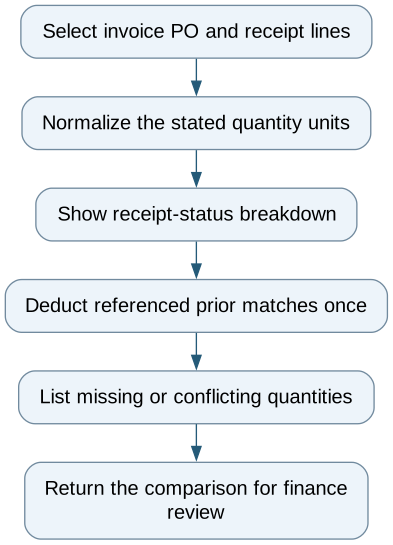
Compare invoice, PO and receipt quantities without hiding partial deliveries — reporting workflow
Follow the workflow below, or open its complete text version.
Read the complete workflow as text
- Select invoice PO and receipt lines → Normalize the stated quantity units
- Normalize the stated quantity units → Show receipt-status breakdown
- Show receipt-status breakdown → Deduct referenced prior matches once
- Deduct referenced prior matches once → List missing or conflicting quantities
- List missing or conflicting quantities → Return the comparison for finance review
Use line keys and compatible units
Retain supplier, PO line, receipt line, invoice line and prior-match references. An order-level join can accidentally allocate one receipt to two different invoice lines. Conversions between boxes and pieces need an explicit factor from the source; absent that factor, show the comparison as incomplete.
Returns, reversals and corrected receipts need links to the original event. A receipt of 80 followed by a reversal is not still 80 simply because the first transaction remains in the history export. Preserve both events and the stated cutoff when reconstructing the quantity.
Demonstrate the difficult cases first
Test a partial receipt, two invoices against one receipt, a held-status receipt, a reversal and a delayed synchronization. The report should explain each quantity and show which records are missing. A retry should not create an additional prior-match entry.
An ERP's native matching screen may already support these views. A worksheet can expose missing definitions before an integration is proposed. Additional software is useful when it retrieves the same line-level evidence consistently across systems.
Bring the resulting comparison to accounts payable with source references and unresolved differences. Approval, partial posting, accruals and payment stay in the established finance process; the reporting pilot does not execute them.
Compare this workflow with your current setup
Share the step that takes the most manual work, the systems involved and the exceptions your team handles. That gives us a concrete starting point for comparing approaches.
Sources and further reading
Sources checked 15 October 2026. Worked examples and workflow diagrams are original illustrations, not reported client results.