Pilot purchase approvals without losing urgent factory requests
For procurement, stores and subcontract operations teams · Plan implementation
TL;DR — what you’ll learn
- Pilot one plant and purchasing category with line-level authority and a documented urgent-request path.
- Treat a changed quantity, price or specification as a changed approval basis.
- Connect requisition identity to PO creation so retries cannot create duplicate orders.
- Measure decision time and unresolved exceptions while keeping purchasing approval with authorised people.
A maintenance buyer needs bearings urgently. The requisition also contains routine tools, and the whole document waits for a reviewer concerned only with the second line. A workaround moves approval into a chat message; the ERP receives an order without a reliable record of what was approved.
A useful purchase-requisition pilot preserves line-level decisions where the policy permits them, while keeping budget, technical and commercial authority explicit. Urgency needs an owned escalation path, not an invisible bypass.
Set the pilot boundary
Start with one plant and a defined maintenance-spares category. Include request capture, completeness checks, review, approved PO creation and exception reconciliation. Keep supplier qualification, technical substitution and payment approval in their existing authorised processes.
Microsoft documents independent line review, but requires all lines and the whole requisition to complete review before the requisition becomes Approved. PO generation follows requisition approval in that documented flow. Independent line review is therefore not independent PO release. Microsoft purchase-requisition workflow.
Follow one request through an amendment
This illustrative requisition has two lines. Amounts exclude tax and freight and do not imply an approval threshold.
| Line | Original request | Original amount | Changed request |
|---|---|---|---|
| Bearings | 4 at ₹2,500 | ₹10,000 | 6 at ₹2,500: ₹15,000 |
| Tools | 2 at ₹1,500 | ₹3,000 | Unchanged |
| Total | — | ₹13,000 | ₹18,000 |
The bearing approval for four units cannot silently authorise six. Store the line revision and its amount/specification snapshot. Re-evaluate the changed line and any document-level authority affected by the new total. Preserve the tools' decision only if policy allows it; do not assume independent line routing removes document-level controls.
If policy permits a separate urgent requisition or another supported purchasing route, record its approver and link it to the original need. Do not imply that the cited Dynamics workflow releases an unfinished requisition's urgent line separately. A later routine order must recognise the earlier commitment so the same request is not purchased twice.
A changed request needs a checked approval basis
Scroll horizontally to explore the full diagram, or open the text version below.
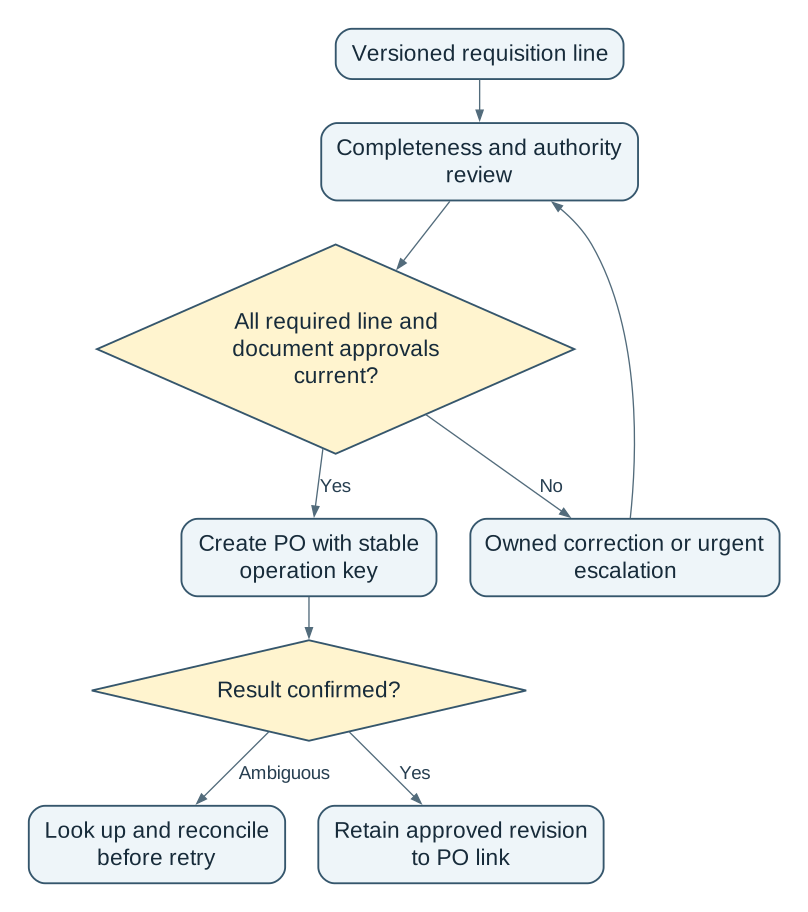
Read the complete workflow as text
- Versioned requisition line → Completeness and authority review
- Completeness and authority review → All required line and document approvals current?
- All required line and document approvals current? → No: Owned correction or urgent escalation
- Owned correction or urgent escalation → Completeness and authority review
- All required line and document approvals current? → Yes: Create PO with stable operation key
- Create PO with stable operation key → Result confirmed?
- Result confirmed? → Ambiguous: Look up and reconcile before retry
- Result confirmed? → Yes: Retain approved revision to PO link
Connect the records and their owners
Required inputs include requester, plant, cost object, item/specification, quantity/unit, needed-by date, reason, supplier scope, budget lookup and current delegation rules. Preserve the supporting document revision rather than replacing the attachment after approval.
The requester explains the need. The technical owner checks suitability where required. The budget/department owner approves within authority, and purchasing creates the commercial commitment. Delegation needs a defined scope and effective period. A missing or expired delegation goes to an exception queue with a named owner.
Integrate with the ERP's supported requisition/PO interface, identity service and budget source. Use a stable operation key tied to the approved requisition line and revision for each authorised PO action. If creation succeeds but the response is lost, a retry must look up the existing result instead of blindly creating another PO. Keep the source-to-PO reconciliation available to purchasing. A new requisition revision does not make prior commitments disappear: if four bearings are already ordered and the approved total rises to six, only two additional bearings are needed. Purchasing must choose the supported amendment or additional-order process and reconcile the combined commitment to six.
Measure the work before automating it
Establish a representative purchasing-cycle baseline: request-to-decision time, waiting time by reviewer, manual touches, returned incomplete lines and urgent exceptions. Define whether elapsed time includes weekends or pauses. Segment urgent requests so the pilot cannot claim improvement merely by changing the request mix.
The first stage should run in shadow mode: proposed routing is compared with the authorised process without creating POs. Then permit controlled creation for the bounded scope after purchasing accepts the evidence. AI may extract a quoted item or summarise the request, but a reviewer verifies the fields and rules decide routing from approved authority data.
Rehearse the cases that create commitments twice
| Test | Required result |
|---|---|
| Quantity changes after approval | Changed basis returns to required review |
| Reviewer absent or delegation expired | Owned escalation; no invented authority |
| ERP commits but response times out | Existing PO found; no second commitment |
| Urgent line separated from routine line | Quantities and approvals reconcile across orders |
| Four bearings ordered before total rises to six | Amendment/additional order adds only two; total commitment stays six |
| Rejected request resubmitted | New revision retains the rejection history |
Agree exit criteria before live creation: all seeded authority and duplicate cases must behave as specified, each created PO must reconcile to an approved revision, and unresolved items must have an owner. Compare operational measures with the baseline; do not promise a percentage reduction in approval time.
On failure, stop automated creation and use the existing approved purchasing route. Reconcile committed POs before restarting. Rollback does not mean deleting a supplier commitment that already exists.
The pilot earns expansion when an urgent request can move quickly without losing the exact decision that authorised the purchase. Faster notifications alone are not that outcome.
- Select one plant/category and document its actual authority and urgent path.
- Shadow the routing with amended, split and duplicate requests.
- Enable bounded PO creation only after purchasing accepts the reconciliation and fallback.
Discuss this purchasing pilot with NextEdge Labs using the ERP, request volume band and amendment or approval failure to be tested.
Scope this automation around your operation
Tell us your current systems, transaction volume and the exception you need to resolve. We can discuss a focused first release, its review controls and how to measure the result.
Sources and further reading
Sources checked 15 October 2026. Worked examples and workflow diagrams are original illustrations, not reported client results.