Prepare a receivables review queue from current invoice balances
For finance, costing and accounts teams · Compare approaches
TL;DR — what you’ll learn
- Start from a dated invoice balance and allocated receipts.
- Preserve recorded dispute amounts as a separate dimension.
- Keep unapplied cash visible without assigning it to an invoice automatically.
- Use the queue for internal review; a balance does not authorize customer contact.
A receivables report lists an overdue invoice, but a payment arrived after the report was exported. Another amount is disputed, and a third receipt has no invoice allocation. Sending reminders directly from that old list risks acting on incomplete information.
A narrower first step is a read-only queue that reconciles the inputs and exposes uncertainty. This article does not design collection notices, decide settlement terms or automate contact with customers.
Reconstruct one invoice balance
Consider this original illustration, using supplied records in one currency:
Scroll horizontally to see all columns.
| Input or derived amount | Value |
|---|---|
| Invoice amount | ₹120,000 |
| Allocated receipt | ₹30,000 |
| Remaining invoice balance | ₹90,000 |
| Recorded disputed portion of that balance | ₹20,000 |
| Other open portion in this view | ₹70,000 |
| Separately recorded unapplied cash | ₹10,000 |
The invoice balance is ₹120,000 − ₹30,000 = ₹90,000. Its stated components reconcile: ₹20,000 + ₹70,000 = ₹90,000. The ₹70,000 is labelled other open balance, not an amount approved for collection contact. The separate ₹10,000 is not deducted until an allocation is supplied by the responsible process.
This partial-dispute breakdown is an illustrative reporting model. It is not a claim that every ERP natively stores disputed portions this way. Microsoft documents configurable collections automation and treatment of invoice dispute states; confirm the actual product and configuration before mapping those states into a report. Microsoft collections automation documentation.
Prepare a receivables review queue from current invoice balances — reporting workflow
Follow the workflow below, or open its complete text version.
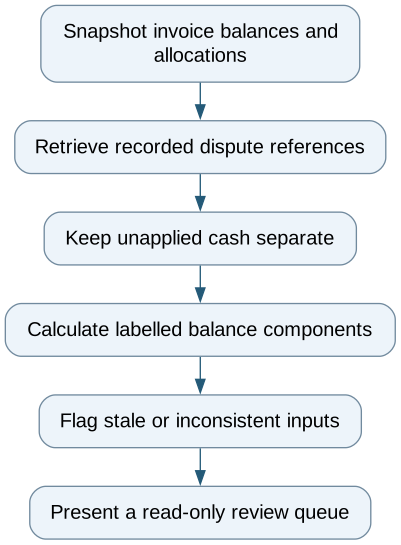
Read the complete workflow as text
- Snapshot invoice balances and allocations → Retrieve recorded dispute references
- Retrieve recorded dispute references → Keep unapplied cash separate
- Keep unapplied cash separate → Calculate labelled balance components
- Calculate labelled balance components → Flag stale or inconsistent inputs
- Flag stale or inconsistent inputs → Present a read-only review queue
Make stale inputs conspicuous
Each queue row needs invoice identifier, currency, supplied due date, balance cutoff, receipt-allocation timestamp and dispute reference. Show the extraction time separately from the business cutoff. A freshly refreshed screen can still contain yesterday's allocations if the upstream feed has stopped.
If the recorded disputed amount exceeds the open balance, flag an inconsistency rather than calculating a negative other-open amount and displaying it as meaningful. Keep credit notes, reversals and allocations linked to their source events. A payment description mentioning an invoice is a possible review lead, not an allocation decision.
Use invoice and company keys rather than customer name alone. A customer may have invoices across several entities or currencies; totals that mix currencies without a declared conversion basis cannot support a reliable comparison.
Test the queue without sending messages
Test a late allocated receipt, unapplied cash, a changed dispute amount, a duplicate invoice import and a reversed allocation. The same source event should change the balance once. The report should make the previous and current cutoff visible when its numbers change.
A native aging report plus a reconciliation worksheet may be sufficient. A read-only integration is useful when the same evidence repeatedly has to be assembled from separate systems. Outbound communications, settlements, write-offs and legal wording are separate scopes with their own owners.
The queue is ready for internal review when each figure can be traced and unknowns remain explicit. That gives finance a current starting point without treating a computed amount as permission to contact a customer.
Compare this workflow with your current setup
Share the step that takes the most manual work, the systems involved and the exceptions your team handles. That gives us a concrete starting point for comparing approaches.
Sources and further reading
Sources checked 15 October 2026. Worked examples and workflow diagrams are original illustrations, not reported client results.