Reconcile job-cost imports with independent source totals
For finance, costing and accounts teams · Compare approaches
TL;DR — what you’ll learn
- Compare the destination with an independent source extract.
- Reconcile by job as well as by overall amount.
- Use stable source keys so retries do not duplicate costs.
- Treat mapping and valuation policy as supplied inputs; the pilot writes no accounting entries.
A job-cost import finishes with no errors, but its report is ₹2,000 short. The missing transaction never entered the import queue, so the queue cannot explain it. A successful transfer is weaker evidence than a reconciliation against the source population.
This article covers a read-only management reporting integration. The source amounts, valuation basis and job-mapping rules are supplied inputs. It does not choose allocation policy, post to the ledger or approve a financial close.
Compare with a separately obtained population
In this original illustration, an independent source extract contains ₹130,000 for the chosen jobs and cutoff. The destination contains ₹128,000. A ₹2,000 subcontract record is absent.
Scroll horizontally to see all columns.
| View | Amount |
|---|---|
| Independent source extract | ₹130,000 |
| Destination report | ₹128,000 |
| Difference to investigate | ₹2,000 |
The test only works if the source extract is independent of the import's selection path. Comparing the destination with the queue that already omitted the transaction would produce a false pass.
Overall totals are not enough either. Suppose ₹2,000 is imported but assigned to Job A instead of Job B. The combined amount is correct while both job statements are wrong. Compare source and destination by job, source type and stable transaction key as well as total value.
Microsoft's production-order cost analysis separates several cost components. Use the actual source system's definitions when assembling a reconciliation; the reporting integration should not invent a universal mapping between those components and accounts. Microsoft production-order cost analysis.
Reconcile job-cost imports with independent source totals — reporting workflow
Follow the workflow below, or open its complete text version.
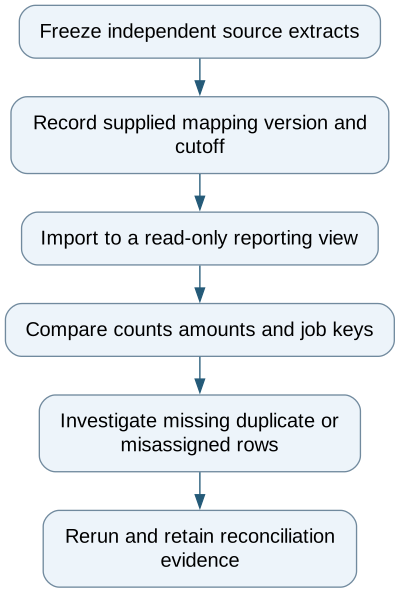
Read the complete workflow as text
- Freeze independent source extracts → Record supplied mapping version and cutoff
- Record supplied mapping version and cutoff → Import to a read-only reporting view
- Import to a read-only reporting view → Compare counts amounts and job keys
- Compare counts amounts and job keys → Investigate missing duplicate or misassigned rows
- Investigate missing duplicate or misassigned rows → Rerun and retain reconciliation evidence
Separate completeness from meaning
A missing key is a completeness exception. An imported key assigned to a different job is a mapping exception. A different supplied amount is a value exception. An unknown valuation rule is a policy question that this pipeline cannot resolve. Keep those categories distinct so a technical repair does not appear to approve a financial interpretation.
Retain source document and line identifiers, source version, job key, currency, supplied amount and cutoff. Record the mapping version used for the import. A correction should have a defined relationship to its earlier version, rather than becoming another unrelated cost row.
Retries should be repeatable: importing the same source version twice must not increase the amount twice. A failed batch should expose which rows were accepted and which remain unresolved. Never infer success only from the absence of an error message.
Preserve the cutoff when late costs arrive
Suppose a later extract includes another ₹3,000 beyond the original population. Its total is ₹133,000. Keep the original ₹130,000 comparison intact and label the newer population and cutoff. Do not rewrite the earlier report so that yesterday's evidence appears to have included the late record.
Start with one job family and independent source exports. Test an omitted record, duplicate retry, wrong-job assignment, corrected source amount and late transaction. Verify both per-job and overall reconciliation.
The pilot succeeds when the report can explain every difference from its source population. The separate job-cost worksheet article covers arithmetic within a statement; this article establishes whether the statement received the intended records at all.
Compare this workflow with your current setup
Share the step that takes the most manual work, the systems involved and the exceptions your team handles. That gives us a concrete starting point for comparing approaches.
Sources and further reading
Sources checked 15 October 2026. Worked examples and workflow diagrams are original illustrations, not reported client results.