Approve alternate components without changing the BOM by accident
For procurement, stores and subcontract operations teams · Compare approaches
TL;DR — what you’ll learn
- Distinguish a permanent BOM alternate from a temporary deviation scoped to named work orders, revisions and maximum quantities.
- Check customer contract restrictions before applying an internal engineering substitution to an order that requires prior customer notice.
- Deduct issued substitute quantities against the deviation cap so an approval for 80 units cannot be reused across later batches.
- Keep technical and customer sign-off in the engineering and quality process; the reservation screen only enforces the recorded scope.

Illustrative factory raw-material stores and receiving counter; not a client facility.
A primary industrial connector (CON-105-AU, gold-plated contacts) is short by 180 pieces across three open production orders for control panel CP-400 (Revision D). Stores holds 250 pieces of tin-plated equivalent CON-105-SN. An engineer approves using CON-105-SN for a domestic commercial order of 80 panels. If the planner flips the global BOM alternate flag in the item master to push the reservation through, the MRP run also allocates CON-105-SN to an export marine order and an automotive customer order that explicitly prohibit contact-finish changes without prior written concession.
This guide describes a scope-comparison check that evaluates substitution permissions per work order, parent revision and quantity cap without mutating the master BOM. Technical equivalence and customer concession decisions remain with engineering and quality owners.
Match each shortage line against explicit substitution boundaries
Consider an original illustrative allocation check for three open work orders requiring CON-105-AU (1 unit per panel; 180 units total shortage) against temporary deviation DEV-2026-44, which authorises up to 100 units of CON-105-SN on CP-400 Rev D for domestic standard panels only.
Scroll horizontally to see all columns.
| Work order | Customer / programme scope | Parent BOM revision | Primary shortage (CON-105-AU) |
Deviation DEV-2026-44 scope match? |
Substitute allocated (CON-105-SN) |
Remaining primary shortage | Remaining DEV-2026-44 cap |
Resulting order status |
|---|---|---|---|---|---|---|---|---|
| WO-801 | Domestic HVAC standard | CP-400 Rev D | 80 | Eligible (revision & customer rule match) | 80 | 0 | 20 (100 - 80) | Released with logged deviation DEV-2026-44 |
| WO-802 | Domestic HVAC standard | CP-400 Rev D | 50 | Partial (eligible scope, but only 20 units remain on cap) | 20 | 30 | 0 (20 - 20) | 20 units allocated; 30 units held for cap extension or primary stock |
| WO-803 | Export marine contract | CP-400 Rev D | 50 | Blocked (customer concession required before substitution) | 0 | 50 | 0 | Blocked from substitute; retains 50-unit primary shortage |
| Total | — | — | 180 | 100 units eligible within cap | 100 | 80 | 0 remaining on cap | 150 units of CON-105-SN stay unallocated in stores |
Every balance reconciles across the three work orders:
- Of the 180-unit total shortage, 80 units on
WO-801and 20 units onWO-802consume the exact 100-unit deviation limit onDEV-2026-44. - Even though stores physically holds 250 units of
CON-105-SN(leaving 150 units on the shelf), the remaining 30 units onWO-802cannot be issued until engineering raises the deviation cap, and the 50 units onWO-803remain blocked because the marine contract requires customer sign-off. - The master BOM for
CP-400 Rev Dremains unchanged (CON-105-AUstays primary), and the work-order pick list forWO-801recordsDEV-2026-44on the as-built issue transaction.
Reference documentation on Microsoft engineering change management, the engineering change FAQ and AIAG Quality Core Tools highlights why version control, transaction-level recording and customer change rules must be verified before substituting components.
Approve alternate components without changing the BOM by accident — reporting workflow
Follow the workflow below, or open its complete text version.
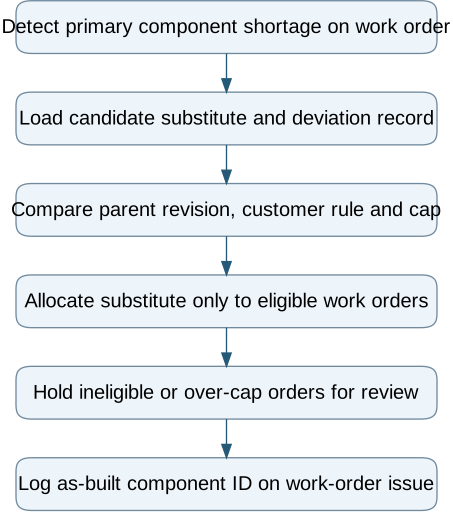
Read the complete workflow as text
- Detect primary component shortage on work order → Load candidate substitute and deviation record
- Load candidate substitute and deviation record → Compare parent revision, customer rule and cap
- Compare parent revision, customer rule and cap → Allocate substitute only to eligible work orders
- Allocate substitute only to eligible work orders → Hold ineligible or over-cap orders for review
- Hold ineligible or over-cap orders for review → Log as-built component ID on work-order issue
Prevent expired deviations from carrying into future MRP runs
Every substitution record needs both an expiry date and a cumulative quantity counter. If a planner copies a past work order to create next month's schedule, the copy routine must strip any work-order-specific deviation reference and revert the component requirement to the active master BOM revision.
Audit recent component substitutions against master BOMs
Review the last ten shortage substitutions executed on the shop floor. Check whether each substitution left the master BOM untouched, whether the as-built work order recorded the actual part issued, and whether any customer-restricted jobs were checked before material release.
Compare this workflow with your current setup
Share the step that takes the most manual work, the systems involved and the exceptions your team handles. That gives us a concrete starting point for comparing approaches.
Sources and further reading
Sources checked 15 October 2026. Worked examples and workflow diagrams are original illustrations, not reported client results.
