Reconcile BOM revision records across open factory work
For production managers, planners and plant leaders · Compare approaches
TL;DR — what you’ll learn
- Compare open work against a supplied revision decision, not a blanket “latest revision” rule.
- Keep job, purchase-line and destination-system references visible.
- Distinguish a decision that is missing from an approved decision that has not appeared downstream.
- Use a read-only impact list before considering automated updates.
Engineering records revision B while stores, purchasing and production still display different versions. A dashboard that simply labels every revision A record “wrong” may be misleading: the applicable version for open work depends on a decision that the dashboard cannot make.
A useful first step is narrower. Reconcile the revision recorded on each object with the expected version explicitly supplied by the responsible engineering process. Show missing decisions and missing acknowledgements separately. This article does not decide effectivity, substitutions, WIP conversion or rework.
Build an impact list without prescribing a disposition
Consider these original illustrative records:
Scroll horizontally to see all columns.
| Object | Quantity | Current record | Comparison input needed |
|---|---|---|---|
| J101, started job | 40 assemblies | Revision A | Applicable revision decision for J101 |
| J102, released job | 30 assemblies | Revision A | Applicable revision decision for J102 |
| J103, planned job | 30 assemblies | Revision A | Applicable revision decision for J103 |
| PO line 7 | 60 fasteners | Drawing reference A | Applicable purchase-line reference |
The three jobs total 100 assemblies. The 60 fasteners are a separate unit and must not be added to create “160 affected units.” Nor does the list establish that all 100 assemblies need a change. Until a decision reference is supplied, the expected-version field remains unknown.
If the supplied decision later states B for J103, compare J103's recorded version with B and display a mismatch while it still says A. Do not infer the treatment of J101 or J102 from that result.
Microsoft's engineering-change documentation describes impact analysis for open transactions and distinguishes approval from processing changes. The proposed read-only comparison uses that separation; it does not reproduce every native capability. Microsoft engineering change management.
Reconcile BOM revision records across open factory work — reporting workflow
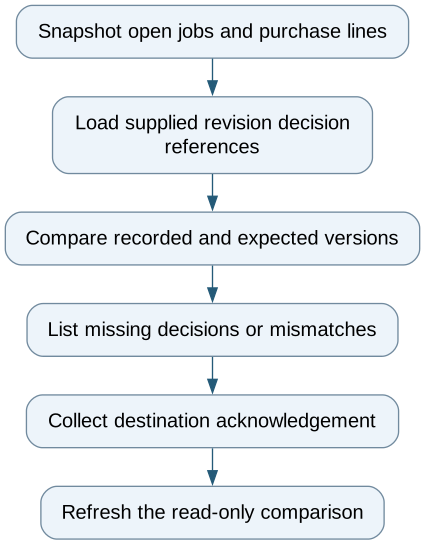
Follow the workflow below, or open its complete text version.
Read the complete workflow as text
- Snapshot open jobs and purchase lines → Load supplied revision decision references
- Load supplied revision decision references → Compare recorded and expected versions
- Compare recorded and expected versions → List missing decisions or mismatches
- List missing decisions or mismatches → Collect destination acknowledgement
- Collect destination acknowledgement → Refresh the read-only comparison
Separate three kinds of missing evidence
A missing decision means the expected version is unavailable. A source mismatch means the recorded version differs from the supplied expectation. A missing destination acknowledgement means there is no evidence that a particular downstream system has received or applied the intended version.
These can coexist. A successful message delivery is not proof that the destination's work order now contains the correct revision. Capture the destination record key, returned version and observation time. If a destination cannot expose those fields, label the comparison incomplete.
Retain identifiers at line level. Purchase order numbers alone may join unrelated items, and part numbers alone may join unrelated jobs. Include the decision version and source cutoff so a corrected instruction does not rewrite the history of yesterday's review.
Demonstrate partial propagation
Use one job whose supplied expectation changes, one whose expectation remains A and one with no supplied decision. Then simulate a destination that still displays the earlier version. The report should preserve all three distinctions and expose the stale destination even if the message queue is empty.
Start with existing ERP impact reports and a controlled export. Add a read-only integration when manual reconciliation becomes unreliable. Writing revised masters, changing released work and deciding customer notification are a separate implementation with engineering ownership.
The immediate outcome is an explainable list of records requiring attention, with enough evidence for their owners to act through the established change process.
Compare this workflow with your current setup
Share the step that takes the most manual work, the systems involved and the exceptions your team handles. That gives us a concrete starting point for comparing approaches.
Sources and further reading
Sources checked 15 October 2026. Worked examples and workflow diagrams are original illustrations, not reported client results.