Reconcile person-time and machine-time without mixing units
For people operations, production and planning teams · Compare approaches
TL;DR — what you’ll learn
- Add person-hours to person-hours and machine-hours to machine-hours.
- Compare bookings with an explicitly supplied available-time window.
- Detect interval overlap as well as a difference in totals.
- Treat discrepancies as data questions, not payroll or misconduct conclusions.
An operator monitors two machines during part of a shift. The production system records more machine-hours than the operator's person-hours. That difference may be entirely explainable: the records measure different things.
A useful reconciliation names the unit, window and source before comparing totals. This article uses a supplied available-time figure; it does not determine paid hours, breaks, overtime or attendance entitlement.
Reconcile one person's bookings
In this original illustration, the source supplies eight available person-hours after its own break treatment. The booked activities are non-overlapping:
Scroll horizontally to see all columns.
| Activity | Person-hours |
|---|---|
| Job A | 3 |
| Job B | 3 |
| Setup activity | 1 |
| Other recorded activity | 1 |
| Total | 8 |
The sum is 3 + 3 + 1 + 1 = 8 person-hours. The same window contains 12 machine-hours across two machines. Twelve machine-hours do not imply 12 person-hours and should not be added to the person's eight-hour account.
If the person-time bookings instead total nine hours against the supplied eight-hour window, the arithmetic excess is one hour. Investigate the intervals and source records. The difference alone does not establish overtime, incorrect pay or deliberate misreporting.
A total of eight can also conceal an overlap: two bookings may share the same half hour while another half hour is missing. Preserve start and end timestamps so the report can detect that problem rather than checking only the sum.
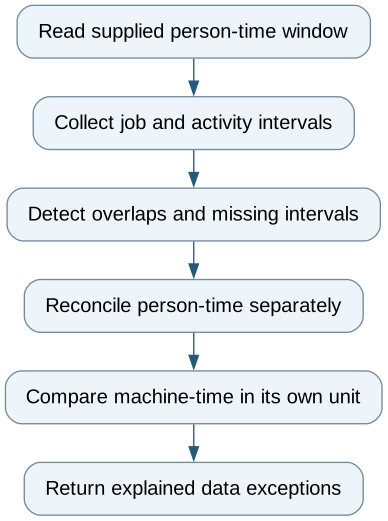
Reconcile person-time and machine-time without mixing units — reporting workflow
Follow the workflow below, or open its complete text version.
Read the complete workflow as text
- Read supplied person-time window → Collect job and activity intervals
- Collect job and activity intervals → Detect overlaps and missing intervals
- Detect overlaps and missing intervals → Reconcile person-time separately
- Reconcile person-time separately → Compare machine-time in its own unit
- Compare machine-time in its own unit → Return explained data exceptions
Make time boundaries reproducible
Use one stated time zone and interval convention, such as including the start and excluding the end, for the comparison. Retain event time, entry time and correction references. Overnight work can cross a calendar date without representing two separate shifts.
Keep the supplied break treatment visible. Do not subtract it again if the available-time total is already net of breaks. Likewise, a source duration already adjusted for overlap should not be adjusted a second time by an undocumented transformation.
Frappe's auto-attendance documentation describes an actual shift-end boundary that includes the configured checkout allowance, and processing after synchronization passes that boundary. A missing processed attendance record before that point is not by itself evidence of absence. Product behavior also depends on configuration. Frappe auto-attendance documentation.
Test corrections and late records
Use synthetic person IDs and test overlapping jobs, a missing checkout, a late event, an overnight interval and a corrected booking. Keep machine events in a separate series. A correction should replace or reverse the relevant record once, not add another independent duration.
An export and worksheet may be enough to explain a disputed total. A read-only integration is useful when time systems repeatedly disagree about the same events. Payroll export and employment decisions are a separate scope with their own rules and owners.
The first deliverable is a transparent account of the supplied time window: booked intervals, gaps, overlaps and source differences. That gives the responsible team evidence to review without turning a data mismatch into an unsupported conclusion about a person.
Compare this workflow with your current setup
Share the step that takes the most manual work, the systems involved and the exceptions your team handles. That gives us a concrete starting point for comparing approaches.
Sources and further reading
Sources checked 15 October 2026. Worked examples and workflow diagrams are original illustrations, not reported client results.