Show parts and access gaps before maintenance scheduling
For production managers, planners and plant leaders · Compare approaches
TL;DR — what you’ll learn
- Take due tasks from the existing approved maintenance plan.
- Report parts and access-window fields as planning information.
- Keep data completeness separate from permission to start work.
- Label completion-record counts without implying verified maintenance or safe operation.
A maintenance schedule lists 20 tasks, but some have no parts record and others have no production-access window. A planner needs to see those gaps before arranging the week. A useful first report compares existing planning inputs; it does not decide maintenance intervals or authorize work.
This scope matters because “ready” is easily misunderstood. Two populated fields cannot prove that people, isolations, permits, procedures or equipment conditions are suitable for the task.
Count the missing inputs explicitly
For this original illustration, the existing plan supplies 20 due tasks. The report uses mutually exclusive categories:
Scroll horizontally to see all columns.
| Planning-data category | Tasks |
|---|---|
| Parts field and access-window field both supplied | 12 |
| Parts field missing, including any task also missing an access window | 5 |
| Parts field supplied but access window missing | 3 |
| Total due tasks in the supplied plan | 20 |
The categories total 12 + 5 + 3 = 20. Twelve of 20, or 60%, have both specified fields. Label this “two-field planning-data coverage.” It is not a ready-to-work percentage. The report has not verified that parts are physically available or the window remains usable.
The category rule prevents a task missing both fields from being counted twice. The underlying row should still show both missing values, so the summary does not hide the second gap.
HSE's maintenance guidance emphasizes planning and competent maintenance. It provides background for keeping a planning screen distinct from a safe-work decision; it is UK guidance, not a statement of every site's legal requirements. HSE maintenance guidance.
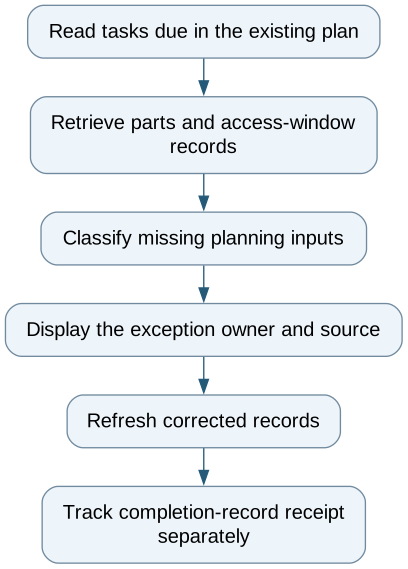
Show parts and access gaps before maintenance scheduling — reporting workflow
Follow the workflow below, or open its complete text version.
Read the complete workflow as text
- Read tasks due in the existing plan → Retrieve parts and access-window records
- Retrieve parts and access-window records → Classify missing planning inputs
- Classify missing planning inputs → Display the exception owner and source
- Display the exception owner and source → Refresh corrected records
- Refresh corrected records → Track completion-record receipt separately
Show the age of each planning input
Retain task ID, plan version, supplied due date, part-reference timestamp and access-window timestamp. A window captured last week may be stale even though its field is populated. Display the last confirmed source value and the current refresh status rather than presenting cached data as a new confirmation.
A missing input needs a named reporting owner and a source link. The report can route a data question or show a response reference. It cannot approve a maintenance deferral, extend an interval or treat production pressure as permission to work.
Keep completion records in a separate measure
Suppose ten completion records arrive against the same 20 task IDs. The receipt coverage is 10/20 = 50%. Deduplicate by task and completion-event identifier before counting. “Record received” does not establish that the task was satisfactorily performed or that the asset may return to service.
If the plan changes, preserve the original denominator and label the revised plan separately. Otherwise removing overdue tasks from the plan can make the report appear to improve without any new evidence.
Start with a spreadsheet or existing maintenance-system report. Test a task missing both inputs, a cancelled window, a stale parts feed, duplicate completion messages and a changed plan. A read-only integration is worthwhile when those exceptions repeatedly require manual reconciliation.
The outcome is a clearer planning conversation with traceable inputs. Work authorization and asset release continue through the site's established safety and maintenance processes.
Compare this workflow with your current setup
Share the step that takes the most manual work, the systems involved and the exceptions your team handles. That gives us a concrete starting point for comparing approaches.
Sources and further reading
Sources checked 15 October 2026. Worked examples and workflow diagrams are original illustrations, not reported client results.