Evaluate production scheduling against machines, people and materials
For production managers, planners and plant leaders · Compare approaches
TL;DR — what you’ll learn
- Evaluate whether the schedule is executable with the actual shared resources and material dates.
- Model a scarce setter or tool separately from machine run time when the process requires it.
- Compare manual dispatch, native ERP scheduling and an advanced planning system with the same test jobs.
- Require the planner to see infeasibility and approve changes; a neatly filled Gantt chart is not acceptance.
Two machines are free at the start of the shift. The scheduler puts a new job on each at 08:00, but there is only one setter. The chart has respected machine capacity and still created an impossible start.
Job shop production scheduling software needs an explicit constraint model. A resource is more than a machine: it can be a person with a specific task authorisation, a shared tool, an inspection stage or material that becomes usable only at a certain time.
Use a small schedule that can be checked by hand
This illustrative cell has machines M1 and M2, one setter, and no other constraints for the example. Each job needs a 30-minute setup followed by a two-hour run. The approved method permits the setter to leave after setup. Both jobs have eligible material at 08:00.
| Job | Setup | Run | Completion |
|---|---|---|---|
| A on M1 | 08:00–08:30 | 08:30–10:30 | 10:30 |
| B on M2 | 08:30–09:00 | 09:00–11:00 | 11:00 |
Scheduling both setups at 08:00 would double-book the setter. If B's material becomes usable at 09:15, its setup cannot begin before 09:15 under this example's rule; completion moves to 11:45. The planner must see the changed promise and decide how to respond.
The times exclude breaks, transfer, inspection and other real-world constraints deliberately. Add them when the actual route requires them. An acceptance example should be simple enough to verify without pretending it is a complete factory model.
Check schedule feasibility before release
Scroll horizontally to explore the full diagram, or open the text version below.
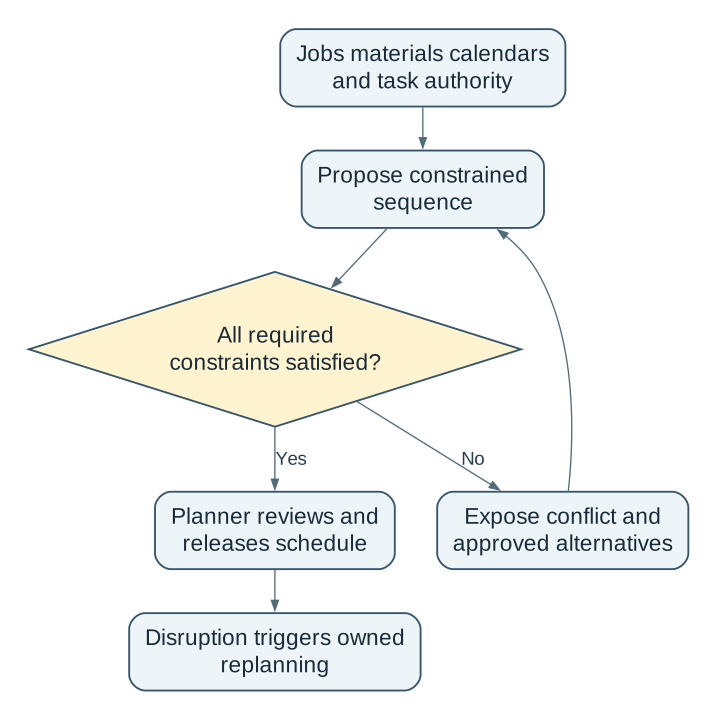
Read the complete workflow as text
- Jobs materials calendars and task authority → Propose constrained sequence
- Propose constrained sequence → All required constraints satisfied?
- All required constraints satisfied? → Yes: Planner reviews and releases schedule
- All required constraints satisfied? → No: Expose conflict and approved alternatives
- Expose conflict and approved alternatives → Propose constrained sequence
- Planner reviews and releases schedule → Disruption triggers owned replanning
Compare three implementation choices
| Approach | Useful when | What to demonstrate |
|---|---|---|
| Manual dispatch board | Few active constraints; planner can maintain current facts | Shared setter and delayed material remain visible |
| ERP finite scheduling | Routings, calendars and reservations are reliable in the ERP | Configured engine represents the necessary resources and changes |
| Advanced planning and scheduling (APS) system | Complex alternate routes, setups or competing constraints justify it | Feasibility, explainable trade-offs and controlled ERP handback |
Microsoft documents that finite capacity depends on plan/resource settings and time fences, and warns about particular capacity-change limitations. Verify the installed engine's behaviour rather than relying on the feature name. Microsoft finite-capacity planning.
Decide who may change the model
The planner owns the proposed sequence. Production confirms realistic run and setup assumptions. Engineering owns approved route alternatives. HR/operations supplies availability and task authorisation; quality supplies required release or inspection constraints. A commercial owner approves changed customer commitments.
Keep job priority, operation precedence, resource calendars, eligible materials, setup rules and model version with the schedule. A manual override needs a reason and an expiry or review point. Do not let an urgent-order flag bypass an unavailable skilled person or held material.
Freeze only the portion the operation can realistically commit to, using the site's approved policy. Outside that boundary, make replanning visible. Inside it, route consequential changes to the responsible owner instead of silently replacing the shop-floor instructions.
Test disruption and handback
Remove the setter, delay B's material, make M1 unavailable and resend a completed-operation event. The software should explain which constraint prevents a schedule, preserve the approved version and avoid scheduling completed work again. Confirm which system owns job status when ERP and shop-floor events arrive in a different order.
Begin with shadow schedules for one cell. Compare proposed start feasibility, planner effort and missed constraints against the existing approach over representative shifts. Set improvement targets after the baseline; do not infer a delivery improvement percentage from a demonstration.
AI can help explain a scenario or suggest a sequence. Feasibility must be checked against explicit constraints, and the planner retains release authority. During an outage, use the last approved dispatch method and reconcile events before resuming automated updates.
A scheduling decision is credible when the team can explain why a job can start and what must change when it cannot. The best-fitting tool is the one that represents those facts and hands the decision back safely.
- Choose a cell with one real shared constraint.
- Reproduce the two-job test and then add a material delay.
- Compare tools on feasible decisions, override evidence and recovery before buying broader optimisation.
Discuss a scheduling evaluation with NextEdge Labs using your constraint map, current ERP and the decisions the planner cannot currently explain.
Compare this workflow with your current setup
Share the step that takes the most manual work, the systems involved and the exceptions your team handles. That gives us a concrete starting point for comparing approaches.
Sources and further reading
Sources checked 15 October 2026. Worked examples and workflow diagrams are original illustrations, not reported client results.